Just For Domino Home    |      Popular    |      Companies    |      Resellers    |      Search    |      Partner Login
Lotus Notes and Domino get better with every App.
Applications for Lotus Notes are like nothing you've ever seen on a desktop.

MayFlower Software

Management: Frank Paolino

Blog: Lotus Notes Email

  
SpamSentinel Sidebar Client           Tweet this Product       Share on Facebook

Download Link


Easy Quotes
Click for a same-day quote for
SpamSentinel Sidebar Client

Quotes will be mailed to you within one business day.

Looking for Resellers of
SpamSentinel Sidebar Client ?
You can get a quote from a
SpamSentinel Sidebar Client reseller

Permalink
SpamSentinel Sidebar Client for Lotus Notes
The best way to stop Spam for Lotus Notes mail users


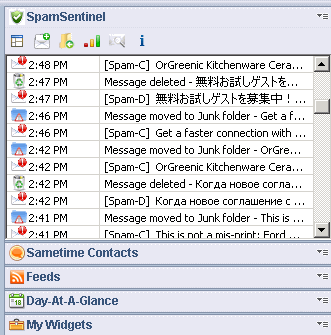
We took our fantastic Lotus Notes SpamSentinel and fit it into the Lotus Notes sidebar!

It is easy to install (2 minute install). SpamSentinel uses a web service listing all known spam, so you do not have to enter email address and domains.

The workstation version requires no administrator support. It installs in minutes for your Notes client, and begins blocking spam immediately.

Additionally, SpamSentinel Client lets you identify Newsletters and Junk without any rules, just by telling it that this sender is a Newsletter. Then, even if it is not spam, it will always go directly to your Newsletter folder.

Runs on all Notes 8.5 clients, including Macs, Linux and Windows!


Looking for an on-premise solution? SpamSentinel can run right on your Lotus Domino server with this version: SpamSentinel

Looking for a Hosted solution? Our Hosted SpamSentinel cloud service is available here: Hosted SpamSentinel


Product Reviews


SpamSentinel Sidebar Client is rated 5 out of 5 based on 2 user reviews.

Average Customer Review: 5.0
 (2 customer reviews)
Share your thoughts with other customers

5-star
 (2)
4-star
 (0)
3-star
  (0)
2-star
  (0)
1-star
 (0)

5
11/27/2012
View profile for Keith Hermiz Notes spam pretty much gone
Keith Hermiz ( IBM )


I work for IBM and am one of a growing number of employees who have chosen to BYOD - "bring your own device" -- as my computing platform. My BYOD is a Mac but I needed to continue to use Lotus Notes as my business email client. Quite a bit of spam bleeds through our corporate filters so I wanted to address this and get closer to "Mac nirvana." My search led me to SpamSentinel Client. Wow. It integrates seamlessly as a widget as has worked day-1 with no muss or fuss. It uses a straightforward approach, leveraging a database of spam sources to ID unwanted email. It has overrides that let you declare emails as spam, not spam or "always file to." A sidebar window lets you see its decision making -- very comforting as you get started with the tool. Right now its quite nearly 100% doing what I would want for me. No more trying to pick out the legitimate emails from a sea of spam or, worse yet, risking deletion of legitimate email during the spam purges. Mac nirvana? One step closer ...

5
04/18/2012
View profile for Nasir Billoo Spam Sentinel does a good job blocking spam
Nasir Billoo ( Kaba Workforce Solutions )


Spam Sentinel does a good job blocking spam in Lotus Notes. It has been very reliable at blocking spam several categories of spam for us. The support from the company is excellent, they were very helpful in answering all my questions.


Copyright © 2010-2011 JustForDomino    |      Post a Comment    |      Recommend an App    |      Privacy    |      About

118a